Working with gr-gsm and collecting nearby IMSIs
Source: UT3USW's personal blog
Only the passive approach is described here. The active approach will be added later as a separate article.
Hardware you need
- An RTL-SDR or a HackRF One
- An antenna that at least somehow receives the GSM 2G frequencies
- A computer running Linux
Installing GNU Radio
sudo add-apt-repository ppa: gnuradio/gnuradio-releases
sudo apt-get update
sudo apt-get install gnuradio
Installing gr-gsm
gr-gsm is a set of blocks and tools for GNU Radio that process GSM traffic
git clone https://gitea.osmocom.org/sdr/gr-gsm
cd gr-gsm
mkdir build
cd build
cmake ..
mkdir $HOME/.grc_gnuradio/ $HOME/.gnuradio/
make
sudo make install
sudo ldconfig
You can read more here: https://osmocom.org/projects/gr-gsm/wiki/Installation
Intercepting GSM traffic and collecting IMSIs
A good first step, to check that everything works, is to run sudo grgsm_scanner. From the
moment you start it, it searches for and lists all the nearby base stations. It may take
about a minute before you see any stations.
#RTL-SDR
grgsm_scanner --band=GSM900  --gain=34 --speed=5 --args=rtl=0

#HackRF
grgsm_scanner --band=GSM900  --gain=40 --args=hackrf=0
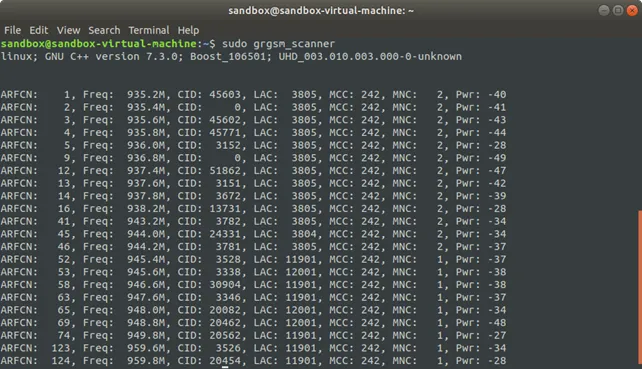
You can look up the operator codes (MNC) here: https://mcc-mnc.com/
Pick the base station whose traffic you want to sniff. Its signal strength is shown in the
far right-hand column; numbers closer to zero mean a stronger signal. For this example I
will use the station on 949.8 MHz. You can intercept the traffic with
sudo grgsm_livemon -f 949.8M.
To make sure everything is definitely fine, you can run sudo grgsm_livemon -f 949.8M and
see the traffic appear in the console as an endless stream of "bytes". If that is fine, you
can move on to the next step. (Do not forget to stop grgsm_livemon here.)
# RTL
grgsm_livemon_headless --fc 949.8M --gain 34 --args rtl=0

# HRF
grgsm_livemon_headless --fc 949.8M --gain 40 --args hackrf=0
Now you can start Wireshark with the filter: wireshark -k -Y '!icmp && gsmtap' -i lo &
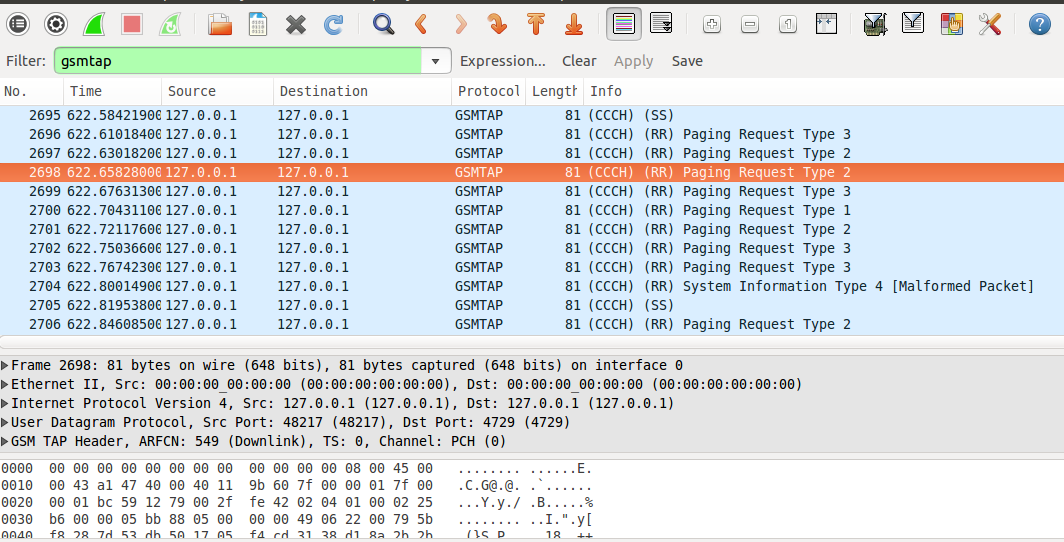
Now you can look for the e212.imsi packet and it will all be there.
You can also run python3 simple_IMSI-catcher.py from https://github.com/Oros42/IMSI-catcher
Source: UT3USW's personal blog